Pages

Showing posts with label DAQ. Show all posts

Friday, 25 October 2013

Case Study: VBOX Sport Performance Meter

The following blog post is a case study into the device VBOX Sport, a light-weight and portable data logger. Its purpose is to measure performance or lap times.

Description

VBOX Sport is a data logger than can be stand-alone or can be connected to an iOS device via Bluetooth. It has a robust and waterproof enclosure and it is lightweight so that it can be used with ease.

VBOX Sport connected to an iPhone via Bluetooth
The VBOX Sport contains a 20 Hz GPS engine with either an internal or external GPS antenna. It has a battery life of over 6 hours and this battery is rechargeable through USB charging. The VBOX Sport logs data onto an SD card. Included with the device is a Bluetooth interface to iOS devices, free data analysis software, free Performance Test and Laptimer app, and it is compatible with Harry's Lap Timer app.

Apps

Three dedicated iOS apps have been designed for the VBOX Sport. The first is a Performance Test app which displays speed, G-force and braking performance using GPS data that is being logged at 20 times per second. The second app is a LapTimer app which auto selects tracks, predicts lap times, determines the current or maximum speed, records lap times and allows for custom circuit creation. The final app is the Diagnostics app which checks the health of the VBOX Sport hardware and checks the GPS data reception.

In addition to these three dedicated apps, the VBOX Sport is compatible with the app Harry's LapTimer. This app records all types of sensor data provided by the iOS device and has fully automated GPS-based lap timing. This app is $19.99 where as the dedicated apps are free.
Harry's LapTimer App

Analysis Software

Circuit Tools Analysis Software is provided with the VBOX Sport. This software is designed by racing drivers and is easy to use. The SD card with the logged data is input to the PC and the file is selected within the software. The software then automatically detects the country, circuit and track configuration from a database of 400 circuits. To separate the laps contained in the file, start/finish line information is used. The software then determines the fastest lap from the session and displays this in the shape of a graph. Lap times can easily be compared to other laps using this graphing functionality.
Circuit Tools Analysis Software
Features of this software are as follows:

  • Automate tasks and present driver with crucial information quickly
  • Enhanced file loading - interface scans the file giving basic lap information and video preview
  • File transfer wizard - scans PC for removable media and transfers all files into automatically named folders on the hard drive
  • Automatic sector configuration - sector by max speed automatically configured and these can be toggled on and off in the session data
  • Video replay speed variation 
  • Six video playback - up to 6 videos can be played simultaneously

Performance Software

There is also a Performance Tools software that can be downloaded. Again, the software is easy to use by inserting the SD card and selecting the correct file. This software tool allows for analysis of the vehicle's performance, such as acceleration and braking tests.
Performance Tool Software

Specs

Below are a list of the different specifications of the device.

I/O

Inputs and Outputs of VBOX Sport

GPS SPECIFICATIONS

Velocity: 
  • Accuracy: 0.1 km/h
  • Units: km/h or mph
  • Update Rate: 20 Hz
  • Minimum Velocity: 0.1 km/h
  • Maximum Velocity: 1800 km/h
  • Resolution: 0.01 km/h
Acceleration:
  • Accuracy: 0.5%
  • Maximum: 4 G
  • Resolution: 0.01 G
Heading: 
  • Resolution: 0.01° s
  • Accuracy: ± 0.2° s
Position:
  • 2D Position: ± 5 m 95% CEP*
  • Height: 5 m 95% CEP*
*95% CEP (Circle of Error Probable) means 95% of the time the position readings will fall within a circle of the stated radius.

RECORDING AND STORAGE

Recording Options:
  • Record only when moving (default)
  • Record start/stop button
SD Card Memory Usage:
8.7 Megabytes/hour whilst logging.

Environmental and Physical:
  • Input Voltage: +5 volts only
  • Power: 2.5 W max. (charging)
  • IP Rating: IP65 (with connector bungs fitted), IP20 (without connector bungs fitted)
  • Size: 104.5 mm x 72.8 mm x 25.1 mm
  • Weight: 130 g
  • Storage Temperature: -20° C to + 60° C (max. limits), -20° C to +35° C for maximum battery life
  • Operating Temperature: -20° C to + 55° C, 0° C to + 45° C (whilst charging battery - charger will shut down outside this range)

SOFTWARE

Apple Software:
  • VBOX Sport Performance Test
  • VBOX Sport LapTimer
  • VBOX Sport Diagnostics App
Windows Software:
Circuit Tools data analysis software

Cost

The VBOX Sport costs $429.

Advantages of the Device


  • The data logger is very small and waterproof allowing the device to be placed in lots of locations.
  • Very simple to use - plug and play.
  • Software is easy to use and automates a lot of tasks.
  • The apps that are needed for the device are free. 

Disadvantages


  • The system is primarily designed for iOS devices.
  • No real time analysis - have to wait until race finished and SD card is put into PC.
  • Uses GPS - this could fail or have a poor reception.
  • Expensive for what it is.

References

Tuesday, 22 October 2013

Case Study: RaceCapturePro

Case Study: RaceCapture/Pro

The following blog post is a case study into the device RaceCapture/Pro, a powerful, multi-channel data acqusition and control system for motorsport applications.

Description

The RaceCapture/Pro has a powerful processor for data logging. It puts an emphasis on outputs as well as inputs and has on-board Lua scripting that allows for custom behaviours to be defined. 
RaceCapture/Pro
The RaceCapture/Pro uses high frequency 10 Hz GPS for accurately tracking your position. There is a precision 3 axis digital accelerometer used to measure G-forces in all directions and a yaw sensor to measure car rotation and detect over/under steer conditions. There are sensor inputs to measure such things as engine temperature, brake position, boost pressure, wheel speed, RPM and much more. There is a hardware expansion to add future OBD-II and CAN interface upgrades.

On the RaceCapture/Pro, there are connectivity ports that connects an optional real time telemetry expansion that streams the race car data to the Internet, enabling monitoring from the pits. In addition to this, there is software available which allows hardware settings to be configured, as well as performing analysis on the race data. Future expansions to the device include a Bluetooth add-on to connect an android based dashboard, and a predictive lap timer.

Scripting

The Lua scripting language is embedded right on board the RaceCapture/Pro. With Lua the RaceCapture's behaviour at run-time can be controlled. No firmware programming is required. Examples of what can be done with Lua scripting are listed below:
  • Activate a warning light when an input threshold is exceeded, such as temperature or pressure.
  • Log data at a higher rate when in range of a particular GPS coordinate
  • Auto-start/stop logging based on speed, RPM, or another condition
  • Experiment with active aerodynamics by adjusting a wing based on GPS velocity
  • Define logic to control an intercooler sprayer
  • Intercept and remap an OEM sensor

Software

RaceCapture/Pro features software to 
  • Customize logging channels
  • View runtime data
  • Edit custom scripting
  • Perform data analysis and replay
The software is a fully open source system with open standards and open file format. There are frequent software updates and it is end-user customisable. 

Real-Time Telemetry

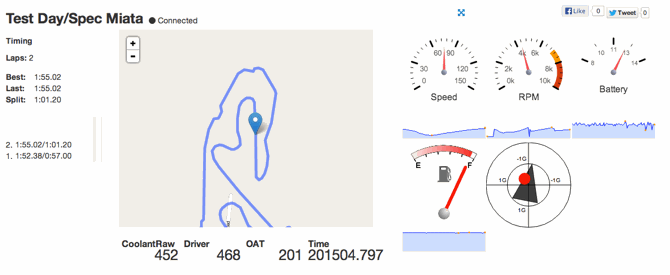
RaceCapture/Pro has a cellular telemetry add-on, RaceCapture/Live, that allows race car performance and stats to be viewed in real time via a pre-paid T-Mobile SIM card. The data streams directly to the cloud to the RaceCapture website and is viewable from anywhere. 

RaceCapture software
The features of the real-time telemetry are as follows:
  • View vital stats from anywhere with an Internet connection
  • Plan your racing and pit strategy based on ral data
  • Share lap times and GPS location with the team's fans
  • Built-in sharing to Twitter and Facebook
  • Track and record lap times
  • Replay and analyse previous events
Review Lap Statistics

Technical Specifications

I/O CHANNELS

RaceCapture offers 25 input and output channels.
  • 7 dedicated 0-5 V analog input channels - measure sensors or process input from other devices
  • 3 dedicated 0-5 V frequency input channels - measure RPM, wheel speed, or any kind of periodic pulse
  • 4 configurable 0-5 V analog or frequency output (PWM) channels - control other systems or even override OEM sensors
  • 3 configurable digital channels, settable for input or output - receive input from switches or digital signals, or configure as output and use to activate accessories or drive indicator lamps with on-board 1A self-protected mosfets
  • 4 Axis Accelerometer: 3 channel accelerometer module plus Z-axis gyro (+/- 2G per acis, 3G optional) - measure and log 3D G-force in real-time with a very accurate accelerometer, Z-acis gyroscope measures yaw/drift in real-time
  • 10 Hz GPS module input - add an external GPS module for course mapping
  • Auxiliary Serial Port - interface to real time telemetry, bluetooth adapter, dashboard display or other interface
  • Digital expansion port - high speed port provides the ability to add CAN bus expansion, more analog or digital channels, integrate speciality sensor hardware such as thermocouple amplifiers and so on

LOGGING

SD memory card slot for data acquisition. Stores up to 32 GB of logging data.

POWER

48 MHz 32-bit ARM processor. Contains enough power to perform high resolution logging and running complex, user-defined logic.

I/O PROTECTION

  • 40 V protection on all input pins
  • Analog outputs protected by auto-resettable fuses
  • Digital outputs are rated at 1 A with self-protected mosfets
  • Over-current protection on 5 V reference
  • 2 A internal switching power supply

MECHANICAL

  • Compact rugged design - unit measures 4 x 3 inches (100 x 82 mm)
  • Easy to use screw terminal block for wiring
  • On-board 'action' switch to start/stop logging (or other use)
  • On-board status LEDs
Example Sensor Connectivity of RaceCapture/Pro

Cost

The RaceCapture/Pro costs $399.

Advantages of the Device

  • Real time telemetry
  • Can share data via Twitter and Facebook
  • Customisable scripting built-in
  • Open-source

Disadvantages of the Device


  • Have to buy a SIM card for real-time telemetry

References